Charlie Kirk was one of the most high-profile conservative activists and media personalities in the US and a trusted ally of President Donald Trump.
Kirk, 31, who the president said died after a shooting at a Utah college on Wednesday, was known for holding open-air debates on campuses across the country.
In 2012, at the age of 18, he co-founded Turning Point USA (TPUSA), a student organisation that aims to spread conservative ideals at liberal-leaning US colleges.
His social media and eponymous daily podcast often shared clips of him debating with students about issues such as transgender identity, climate change, faith and family values.
The son of an architect who grew up in the well-to-do Chicago suburb of Prospect Heights, Kirk attended a community college near Chicago before dropping out to devote himself to political activism. He applied unsuccessfully for West Point, the elite US military academy.
Kirk often referred tongue-in-cheek to his lack of a college degree when engaging in debates with students and academics on esoteric topics such as post-modernism.
His role in TPUSA took off after President Barack Obama was re-elected in 2012.
Kirk toured the country speaking at Republican events, many popular with members of the ultra-conservative Tea Party movement. TPUSA now has chapters in more than 850 colleges.
An avid public speaker, Kirk addressed the Oxford Union earlier this year, and wrote a 2020 best-seller The Maga Doctrine.
TPUSA played a key role in the get-out-the-vote effort for Trump and other Republican candidates in last year’s election. The millennial was widely credited with helping to register tens of thousands of new voters and flipping Arizona for Trump.
Kirk attended Trump’s inauguration in January in Washington DC, and has been a regular visitor at the White House during both Trump terms in office.
The president and his aides valued Kirk’s political antenna for the grassroots of the Make America Great Again movement.
He’s spoken at Republican conventions and last year Donald Trump repaid the favour by giving a big speech at a Turning Point conference in Arizona.
Earlier this year, he travelled with Trump’s son, Donald Trump Jr, to Greenland, as the then-incoming president was arguing that the US should own the Arctic territory.
Kirk’s evangelical Christian religion and family – he married a former Miss Arizona, with whom he had two children – were front and centre in his politics, and he was seen as both the future of conservative activism and a highly polarising figure.
Perhaps the biggest tribute to his contribution to Republican politics came from Trump himself in a clip played at the beginning of Kirk’s podcast.
The president says: “I want to thank Charlie, he’s an incredible guy, his spirit, his love of this country, he’s done an amazing job building one of the most powerful youth organisations ever created.”
Kirk discussed numerous political and social at his events and on his podcasts – gun control is one of them.
Conservative activist Charlie Kirk, the co-founder of Turning Point USA, was shot and killed Wednesday while appearing at an event at Utah Valley University.
President Trump, who grew to be friends with Kirk, announced his death in a post on Truth Social at 4:41 p.m. Wednesday.
“The Great, and even Legendary, Charlie Kirk, is dead,” Trump wrote. “No one understood or had the Heart of the Youth in the United States of America better than Charlie. He was loved and admired by ALL, especially me, and now, he is no longer with us. Melania and my Sypathies go out to his wife Erika, and family. Charlie, we love you!”
Kirk, 31, previously had been reported in critical condition, a law enforcement official who was briefed on the attack told The Associated Press.
Shot appeared to be targeted in the attack, as the shooter did not fire multiple shots into the crowd.
Footage from the event showed a large crowd of students gathered around a tent, under which Kirk sat and spoke, with the words “American comeback” and “Prove me wrong” written on the tent.
One video posted to the social platform X appeared to show Kirk addressing the students, at one point speaking about gang violence, before being struck near the neck and later jerking to his left side. Members in the crowd could be heard gasping, with people saying “Oh my god!” and starting to flee.
Another video posted on X, showing a much closer view, appeared to show Kirk shot in the neck, before jerking over to his left side with blood visibly pouring out.
An alert from the university initially said a suspect was in custody, though authorities later said there was still a hunt for a suspect.
The FBI earlier said it was monitoring the situation.
“We are closely monitoring reports of the tragic shooting involving Charlie Kirk at Utah Valley University,” FBI Director Kash Patel wrote on X.
“Our thoughts are with Charlie, his loved ones, and everyone affected. Agents will be on the scene quickly and the FBI stands in full support of the ongoing response and investigation.”
Utah Gov. Spencer Cox (R) wrote in a post on X that he had been “briefed by law enforcement” on the situation.
“Those responsible will be held fully accountable,” Cox wrote. “Violence has no place in our public life.”
Both Democrats and Republicans took to social media to condemn the violence and offered thoughts and prayers.
“Political violence is NEVER acceptable. My thoughts and prayers are with Charlie Kirk and his family,” House Minority Leader Hakeem Jeffries (D-N.Y.) wrote on X.
“Dear God, protect Charlie in his darkest hour,” Vice President Vance wrote on X.
During a House Oversight and Government Reform Committee markup meeting, Rep. Marjorie Taylor Greene (R-Ga.) asked members for a prayer in light of the shooting, and members held a moment of silence.
If you’re remotely interested in skincare at all, you know that popping pimples or extracting blackheads is a big no-no. But what’s a girl to do when she wants to clear her pores of sebum, oil, and other debris?
You can of course, pay a visit to your dermatologist, as it’s the safest and most effective way to get rid of blackheads, whether that’s through microdermabrasion or classic extractions.
However, if you’re here, you’re likely looking for a quick, affordable fix that you can do at home. The good news is that you’ve got plenty of options.
What are blackheads?
We all know what blackheads look like, but what are they? Blackheads are a type of acne that results from sebum, oil, dead skin cells, and other debris clogging the hair follicles in your skin.
Blackheads happen to everyone, but there are a few factors that can exacerbate the development of blackheads. These factors include hormones, stress, diet, using overly oily products, and improperly cleansing your skin, to name a few.
Price: $11.99 (as of Sep 10, 2025 20:55:31 UTC – Details)
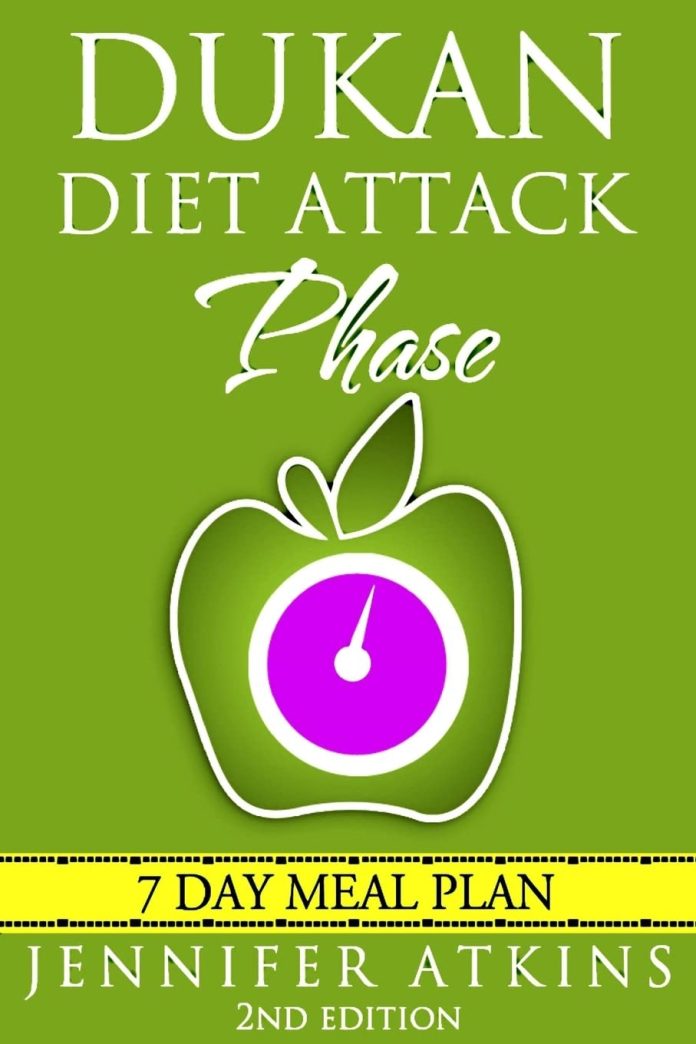
Lose Weight Fast and Get the Most Out of Your Dukan Diet Experience! Do you need to lose weight? Have you tried the Dukan Diet? Would you like to know what to eat during the “attack phase”? When you purchase Dukan Diet (Attack Phase) Guide, your body will get slimmer every day! These fun and easy tips transform the chore of dieting into a delicious, exciting hobby. You’ll be proud to share these recipes whenever friends stop by.This exciting book explains each of the Four Phases of the Dukan Diet. You’ll learn about limiting carbohydrates and filling up on protein instead. You don’t have to limit the food you eat each day – just drink lots of water, exercise, and follow the list of allowed foods! Over 25 delicious Attack Phase RecipesThe amazing recipes in Dukan Diet (Attack Phase) Guide make it easy to stay on your diet! For breakfast, you can eat delicious meals like Chocolate Oat Bran Muffins, Scrambled Eggs with Herbs, Egg and Onion Bhurji, and Breakfast Frittatas. At lunch, you can indulge in Beef Kebabs, Mediterranean Chicken Drumsticks, Mimosa Egg Verrines, and Pan-Fried Trout. Your dinner options include Chicken Pasta, Salmon Ceviche, Steak au Poivre, and Meatball Soup. For dessert, try Coffee Cheesecake, Café crème, Cinnamon Cake, and Hot Chocolate Pudding!Start making your weight-loss dreams a reality! Publisher : CreateSpace Independent Publishing Platform Publication date : December 7, 2015 Language : English Print length : 100 pages ISBN-10 : 1519749112 ISBN-13 : 978-1519749116 Item Weight : 5.1 ounces Dimensions : 6 x 0.23 x 9 inches Best Sellers Rank: #1,872,814 in Books (See Top 100 in Books) #4,879 in Weight Loss Diets (Books) #8,051 in Other Diet Books #14,648 in Special Diet Cooking (Books) Customer Reviews: 4.0 4.0 out of 5 stars 65 ratings var dpAcrHasRegisteredArcLinkClickAction; P.when(‘A’, ‘ready’).execute(function(A) { if (dpAcrHasRegisteredArcLinkClickAction !== true) { dpAcrHasRegisteredArcLinkClickAction = true; A.declarative( ‘acrLink-click-metrics’, ‘click’, { “allowLinkDefault”: true }, function (event) { if (window.ue) { ue.count(“acrLinkClickCount”, (ue.count(“acrLinkClickCount”) || 0) + 1); } } ); } }); P.when(‘A’, ‘cf’).execute(function(A) { A.declarative(‘acrStarsLink-click-metrics’, ‘click’, { “allowLinkDefault” : true }, function(event){ if(window.ue) { ue.count(“acrStarsLinkWithPopoverClickCount”, (ue.count(“acrStarsLinkWithPopoverClickCount”) || 0) + 1); } }); });
About 80 firefighters are tackling a fire at a block of flats in Battersea, south-west London.
The entire top floor and roof of the four-storey residential building on Maysoule Road is alight, London Brigade (LFB) says.
Firefighters are using a 105ft (32-metre) turntable ladder as a water tower to help tackle the flames from above.
The building has been evacuated by fire crews wearing breathing apparatus. Three people have been treated by paramedics, one of whom was taken to hospital.
There are no bad iPads. That’s the best news about Apple’s tablet lineup: 15 years after Steve Jobs first debuted the device, the iPad is the best tablet on the market, and it’s not particularly close. Apple’s App Store is enormous and filled with great apps, Apple’s performance and battery life are consistently excellent, and the iPad is still the company’s most versatile device. That’s one easy answer to your question: yes, if you want a tablet you should buy an iPad. Even last year’s iPad, or heck, last-last year’s iPad is still a solid device. Buying an older but better device — last year’s Pro instead of this year’s Air, for instance — is a tried and true iPad formula.
But which of all those good iPads should you buy? That’s never been more complicated. Apple sells six different iPads — the Pro in two sizes, the Air in two sizes, the Mini, and the regular ol’ iPad — all of which come with different specs and accessory options. It’s all too much.
I’ve tested every iPad currently on the market and have been an iPad user and reviewer since the very first model. (I’m pretty sure I got a job in 2010 because I had a brand-new iPad with me at the interview, but that’s another story.) After using all these tablets and accessories, I think I can help you make the choice.
The simplest way to pick an iPad is by process of elimination. First, there’s your budget: you can spend $350 on an iPad, you can spend $2,728 on an iPad Pro, or you can spend just about anything in between. You should also decide whether you need an Apple Pencil and which one has the features you need, because not every iPad supports every model. The same goes for the keyboard attachments. Between price and accessories, your choice might be instantly obvious.
More broadly, though, your iPad-buying journey starts with two crucial questions. The first is: what kind of iPad user are you? There are roughly two types. The first and most common iPad user mostly uses it like a larger iPhone: it’s a bigger screen on which to send emails, do the crossword, watch Netflix, and other fairly casual activities. The second type of iPad user, on the other hand, uses it like a touchscreen Mac: it’s for video editing, 3D modeling, creating presentations, crushing spreadsheets, and generally Doing Work of all sorts. You’ll also email and Netflix, of course, but you want your iPad to be a primary computing device.
I think most people fall into the first category. (Honestly, I also think a lot of people who believe they fall into the second category… mostly don’t.)
What to consider when buying an iPad:
iPads are incredibly versatile gadgets, so we test them in as many real-world ways as possible. We use them for video chats, we play high-end games and casual ones, we edit complex video, we fall asleep on the couch watching Netflix. We pay close attention to performance, battery life, durability, and compatibility with important apps and accessories. We’ve reviewed every iPad on the market, along with their most important competitors, and track software updates closely as they change the devices’ appeal.
Yes, this is obvious, but it’s good to know how much you want to spend before shopping — otherwise, you risk succumbing to Apple’s incredible ability to always get you spending just a little more. You can get a new iPad for as little as $350, or you can spend well over $1,000 for a top model. Knowing how much you want to pay will guide you to the right models. It might even guide you to older models; sometimes the last-gen iPad, at a steep discount, can be the one to buy.
The most common iPad size these days has a roughly 11-inch screen. This is probably the right size for most people: 11 inches is ideal for a wide variety of things and is flexible for both holding in your hands and using with a keyboard. If you primarily plan to use your iPad for reading, you might want to go with something smaller; if you intend to replace a laptop with an iPad, you might want a bigger model. Be warned, though: a 13-inch iPad is a truly humongous thing.
Apple’s accessory compatibility is somewhat fragmented across its iPad lineup. It has several different Pencil stylus models, a number of different keyboard attachments, and a wide variety of case options. While some iPad models share accessories with others, not all of them do, so if you want to use a specific accessory with your iPad, it’s important to make sure both are compatible before you buy them.
The second question is more complicated to answer, and it’s what makes the iPad-buying process so tricky right now: how long do you expect to keep your iPad? If you’re looking for a device for the kids to beat up or something that will be your travel companion until you inevitably leave it somewhere, you’re going to end up with a very different device than if you’re shopping for your main computer for the next decade. In general, if you take care of your iPad, I think you can reasonably expect it to last at least five years — so that’s the timeline I have in mind as we go through this guide.
I used to say that almost everyone should just get the base iPad. Now, I think there are two options worth seriously considering. No matter which one you choose, all the models on this list will receive Apple’s iPadOS 26 update, which launches on September 15th (and may be out by the time you read this).
$299
The Good
The cheapest iPad by far
Comes in lots of fun colors
Plenty capable for casual use
The Bad
The worst screen in the lineup
Much older chip
No Pencil Pro support
Screen: 11-inch, 2360 x 1640 resolution / Processor: Apple A16 / Storage: 128GB to 512GB Port: USB-C / Cellular: 5G (optional) / Speakers: stereo / Compatible accessories: Apple Magic Keyboard Folio, Apple Pencil (USB-C)
Apple’s base model is still a really good tablet and a pretty good deal: you could buy the $349 tablet and the (wildly overpriced but still very nice) $250 Magic Keyboard Folio for the price of the iPad Air. Now that it comes with at least 128GB of storage, I have few complaints with this device.
The 11-inch screen is the right size for most iPad things, the camera is good and is located in the right place, it supports the Apple Pencil — though not the newer Pencil Pro — and even its A16 chip is plenty for most casual iPad uses. All the other iPads have slightly nicer screens, particularly the antireflective coating that helps mitigate glare, but that’s almost certainly not worth the additional price for most buyers.
Here’s my reservation: the base model iPad is further behind the Air than ever before, and I worry about how that’ll play out over the next few years. If you decide to start using your iPad for more creative tasks, then you might regret not getting the Air’s M3 chip. If, by some miracle, Apple Intelligence becomes awesome in the next few years, you won’t be able to use it.
If you only wanted an iPad to last a couple years, for everyday iPad tasks, I’d tell you to buy this one without a second’s hesitation. But there’s a chance this one will feel old and outdated long before the Air does.
Screen: 11-inch, 2360 x 1640 resolution; 13-inch, 2732 x 2048 resolution / Processor: Apple M3 / Storage: 128GB to 1TB / Ports: USB-C / Cellular: 5G (optional) / Speakers: stereo / Compatible accessories: Apple Magic Keyboard for iPad Air, Apple Pencil Pro, Pencil USB-C
The iPad Air is supposed to be the perfect middle ground of the iPad lineup, and this year’s model gets pretty close. The M3 chip is only a tiny upgrade over the M2 — I don’t even notice it in day-to-day use — but I’ll never complain about having newer chips. The biggest upgrade to the Air this year is actually the new Magic Keyboard, which adds a row of function keys and makes the setup a much more credible laptop replacement. (The new keyboard also works with the M2 Air, and if you can find that device on sale somewhere, it’s still a great tablet.)
The base iPad to iPad Air upgrade is straightforward enough. You get better accessories, a somewhat better screen, and a noticeably better processor for $250. (You also get the option of a 13-inch device for another $200, but I think an 11-inch iPad is the right size for most people — the 13-inch models start to feel more like laptops than tablets.) If you’re playing Netflix and browsing the web, that $250 won’t get you much, but as soon as you start noodling around in Final Cut or even GarageBand, you’ll notice the difference. There’s a lot of room to grow into the Air, whereas the base iPad may hit its ceiling much sooner.
The other thing the Air offers that the base iPad doesn’t is Apple Intelligence. Right now, this is not a problem: there is exactly nothing in Apple Intelligence worth spending $250 on. But if you’re an AI believer, you should know that the base iPad won’t get whatever’s coming.
If you’re not worried about price tags, this is easy: the latest iPad Pro is my favorite tablet of all time. The Tandem OLED screen is bright and crisp, the tablet is barely thicker than its USB-C port, it’s light, it’s thin, and it’s about as well made as you could expect a tablet to be. The M4 chip is plenty fast even for high-end games and ultra-complex creativity apps. It supports the new, lighter, better Magic Keyboard case and the Pencil Pro. I have plenty of qualms about how powerful iPadOS is, and the limits it places on just how powerfully you can use an iPad, but the M4 Pro is everything you’d want in a tablet.
But oh boy, the price. The Pro starts at $999 for the 11-inch model, and if you want a keyboard, a Pencil, and even a single storage upgrade, you’re quickly looking at a $2,000 purchase. If we’re just talking about a Netflix and email machine, we’re long past the point of diminishing returns. But if you don’t care, and you just want the best thing money can buy? Here it is. You won’t be disappointed.
Screen: 8.3-inch, 2266 x 1488 resolution 60Hz Mini LED / Processor: Apple A17 Pro / Storage: up to 2TB / Port: USB-C / Cellular: 5G (optional) / Speakers: quad /Compatible accessories:Apple Pencil Pro, Pencil USB-C, Smart Folio
You’re either an iPad Mini person or you’re not. I very much am: I’ve used a Mini for years as my device for reading in bed, watching movies on airplanes, and playing games on the go. The latest Mini is a bit of a disappointment, with a slightly underpowered processor and an old design that could have used smaller bezels and a relocated camera. But it’s still the iPad Mini, and it’s still good enough for most tablet things. If you want an iPad Mini, this is it.
Once you’ve picked an iPad model, you still have a bunch of decisions to make. And many of them are about specs and features that will cost you hundreds of dollars. Here are my recommendations for some of the things you’ll encounter:
Cellular coverage: You probably don’t need this. Unless you live in a really remote place, Wi-Fi is available in most places. That said, I’ve found that I use cell-equipped iPads far more often when I can just pull them out and know they’re connected — there’s something about busting it out in the park or on the subway that just feels great. Plus, it’s a really useful hotspot for other devices. This isn’t the first place I’d spend my money, though.
Storage: This is the first place I’d spend my money. All the iPads now come with at least 128GB of storage, which is a big upgrade — 64GB was just never enough. Even now, though, I recommend springing for 256GB if you can afford it; you’d be surprised at how quickly your photos, videos, and Netflix downloads add up.
Engraving: Don’t do this. It screws up returns and makes selling or giving it away harder. Just don’t do it.
Apple Pencil: As much as I’d love for this to be an all-purpose accessory, it’s really not. Buy it (either the USB-C or the Pro) if you plan to handwrite or draw a lot. Otherwise, skip it.
Magic Keyboard: This is the first accessory I’d recommend to most people — many people type a lot on their iPads, and it’s also a handy stand and dock for the tablet. You can find cheaper keyboard docks than Apple’s, but I haven’t found one I like better. It’s expensive no matter which model you buy, though.
My gadget shopping advice is always to buy the best thing you can afford and hold it for as long as possible, and that’s more doable with an iPad than almost any other device category. If you have the extra $100 to spend on storage, do it. If you want to upgrade because you think AI will get more powerful in the next few years, go for it! Just make sure you know which kind of iPad user you really are, and get the best one you’ll actually make use of. Hopefully for a long time to come.
For the first time in a while, the iPad lineup feels fairly up to date. The Air, Mini, and base model have all been updated in the last several months. The Pro is actually the oldest device in the lineup, and Bloomberg has reported that an M5-powered Pro could be coming as soon as this year.
Apple does appear to be updating its devices more often than before, sometimes on an iPhone-style annual schedule. Obviously, your iPad doesn’t need to be upgraded that often, and the year-to-year upgrades tend to be small. So our advice still holds: if you need a new one, now’s a good time. If you don’t, there seems to always be an upgrade just around the corner.
Update, September 10th: Adjusted prices and availability.
Polish Deputy Prime Minister Radoslaw Sikorski on Wednesday said Russian President Vladimir Putin is “mocking” the Trump administration’s peace efforts in Ukraine with the incursion of Russian drones in Polish airspace.
“I think Putin is mocking President Trump’s peace efforts and testing nature. We don’t believe this was accidental, because previously, when one or two drones reached our airspace, they came from Ukraine,” Sikorski said during a Wednesday appearance on CNN’s “Situation Room.”
Putin recently met with Trump in Alaska to discuss efforts to end the war in Ukraine. Both leaders spoke with hope about a forthcoming arrangement to ensure conflict in the region died down.
However, the Kremlin’s strikes on Kyiv and other Ukrainian cities has ramped up since the meeting, and the death toll continues to rise.
Overnight, hundreds of drones struck Ukraine and eight made it into Polish territory, causing NATO members to convene to plan its response.
“These drones, a part of them, came from Belarus, and therefore this was likely planned,” he added.
Sikorski said the attack was “accompanied by a Russian disinformation campaign” to confuse the public.
“If you hear someone saying that this was a Ukrainian provocation, you can be sure that this is either Russian propaganda or someone parroting Russian propaganda,” he said.
He urged all NATO allies to take the threat seriously and be prepared to engage when called upon.
“We have not invoked Article Five, but we have invoked Article Four, which says that when a party to the treaty feels threatened, she may consult with allies about what to do…” Kiroski said.
“We also expect allies to back their words of solidarity with these and we need more antiaircraft assets, and we need a drone wall on the border of nature.”
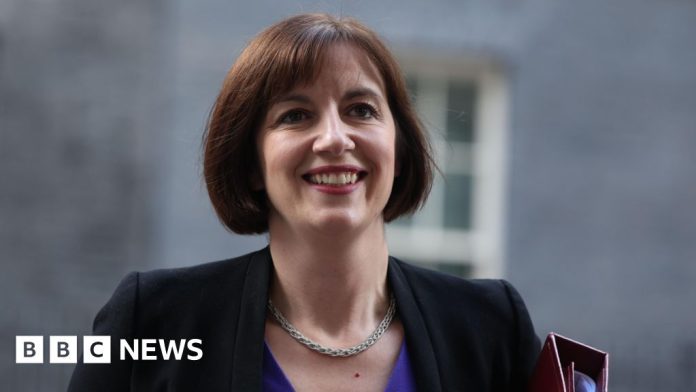
Bridget Phillipson has become the first Labour deputy leadership contender to gain enough support to run, cementing her place as the early frontrunner.
The education secretary has gained the backing of 116 fellow Labour MPs, clearing the bar of 80 nominations required to progress in the contest.
Former Commons leader Lucy Powell remains her closest rival, having garnered 77 nominations, according to figures released by Labour.
She has opened a clear lead over the remaining three candidates, ahead of the Thursday deadline to secure enough backing.
Bell Ribeiro-Addy has 15 nominations, according to the party, ahead of fellow backbencher Paula Barker on 14, with Foreign Affairs Committee chairwoman Dame Emily Thornberry trailing the pack with 13.
Housing Minister Alison McGovern dropped out of the contest earlier, conceding she was failing to pick up enough support and giving Phillipson her backing.
With many Labour MPs yet to declare their favoured candidate, there is still time for other campaigns to gain momentum.
The candidates have a chance to press their case to colleagues at a virtual hustings taking place on Wednesday evening.
The remaining five hopefuls will be at party headquarters in south London, with Labour MPs able to join remotely to ask questions.
Sir Keir Starmer’s cabinet – which includes 24 MPs – have been told not to nominate any candidate, though junior ministers are able to do so.
But some Labour figures wonder if as many as 80 more could choose not to officially back anyone, shrivelling the electorate.
It looks quite likely Phillipson will stack up a very big number of supporters, further squeezing the remaining votes to be fought over.
As the only member of the cabinet to announce her intention to stand, Phillipson is also expected to be more supportive of the government than some of the other candidates.
This may help her secure lots of MP nominations, but may be a disadvantage if the contest reaches the stage where Labour Party members get a vote and there is a rival candidate not in government.
There is talk among Phillipson’s opponents of the need for votes to consolidate around a viable rival, rather than splinter in five different directions.
Many senior Labour figures have called for the new deputy leader to be a women from northern England, to counter what they see as the London-centric and male-dominated party leadership.
Sir Keir and his new Deputy Prime Minister David Lammy – who replaced Angela Rayner in the role after her resignation last week – both represent London constituencies.
Dame Emily – a London MP – has hit back at the idea the winning candidate should be from outside the capital, suggesting it should be about “what you can do for the party”.
A member of Sir Keir’s frontbench team when the party was in opposition, Dame Emily was a surprise omission from the PM’s cabinet when Labour won power.
Signalling her willingness to challenge the leadership, Dame Emily has pledged to “be a voice for the membership, unions, PLP [Parliamentary Labour Party], and our constituents – not just nod along”.
The tight timetable for the contest has been criticised by some in the party, including Ribeiro-Addy, who has suggested it could prevent left-wing candidates from progressing in the contest.
Although the MP for Clapham and Brixton Hill has acknowledged she is unlikely to win, Ribeiro-Addy said she wanted to use the platform to encourage a debate among Labour members about “what’s gone wrong” in the party’s first year in power.
She cited the government’s position on the war in Gaza and attempts to cut benefits as examples.
Rival candidate Barker has also been critical of the government’s response to the conflict and launching her campaign she called for the party to “go back to our true Labour values”, including to “prioritise people over profit”.
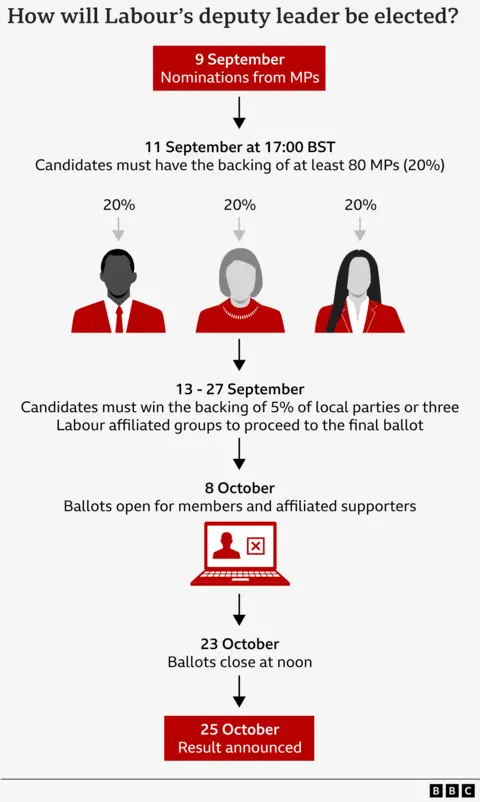
If they secure enough support from their parliamentary colleagues, candidates will then need the backing of either 5% of local parties, or three Labour-affiliated groups, including two unions.
Those who clear the bar face a vote by party members, with the winner announced on 25 October.
Whoever wins the contest, Lammy will remain as deputy prime minister – a role which is appointed by the PM, rather than decided by Labour Party members.